You sent her a PDF. You sent it three weeks ago, then again on Tuesday after the rehearsal moved a half hour later. She has both. She doesn't know which one is current. She is, professionally and rationally, asking the only person who can give her an authoritative answer at 4:47pm: you.
This is the wedding-day version of "which file is the real one." Every planner has lived it. The PDF timeline is a great document for the first time you send it to a vendor, and a terrible one every time after.
Why the PDF stops working the moment things change
A timeline is a living document. A PDF is a frozen one. The mismatch between those two facts is the source of most day-of vendor confusion.
Here's what actually happens between "I emailed the vendors a timeline" and the wedding day:
- The ceremony moves twenty minutes because the officiant has another wedding earlier that day
- The hair-and-makeup window expands because the bride has six attendants instead of four.
- The first look gets added two weeks before the wedding
- The DJ wants to load in earlier than originally planned
- The shuttle company changes the pickup point because of a road closure
Every one of those is normal. None of them are a problem in your planning tool - you adjust the timeline and move on. They become a problem the second they need to propagate to twelve other people, each of whom has a PDF in their inbox from three weeks ago that they may or may not have replaced with the new one. Some of them deleted the old one. Some of them are still working from a printout. One of them never opened the email.
So you start sending updates. A "Timeline v2" PDF, then a "Final timeline" PDF, then a "FINAL FINAL" PDF that everyone makes a joke about because the joke is older than email. And on the wedding day, the photographer who has the v2 file keeps asking when ceremony starts, because v2 said 5:00 and her gut says it changed.
You can't fix this with a better PDF. You fix it by sending vendors something that updates itself.
What vendors actually need
If you ask a wedding photographer what they want from a planner's timeline, they will not say "a PDF." What they will say, if you ask carefully, is some version of these four things:
- Just the parts that involve me. A photographer doesn't need to know the linen drop time. The DJ doesn't need to know about the bouquet toss tableau. Filtering the timeline by vendor isn't a nice-to-have, it's the difference between a useful document and a 14-page wall of text.
- Readable on a phone. Vendors are not sitting at desks reading your timeline. They are walking around a venue with their hands full and one bar of signal. If they have to pinch-zoom a PDF on a 6-inch screen, they're not going to read it. They're going to text you.
- The current version, always. "Current" is the operative word. Not "the latest one I sent you," but the one that reflects what you, the planner, decided thirty seconds ago.
- Their specific call times and locations, surfaced first. A timeline shouldn't bury "DJ load-in at 3:00pm, side door, ask for Marcus" inside a flat list of fifty rows. The most operationally important information for that vendor should be at the top.
Notice that none of these are about aesthetics. Vendors don't need branded letterhead and embedded photos. They need to know, on their phone, in the parking lot, what time they're supposed to be where.
The version we built
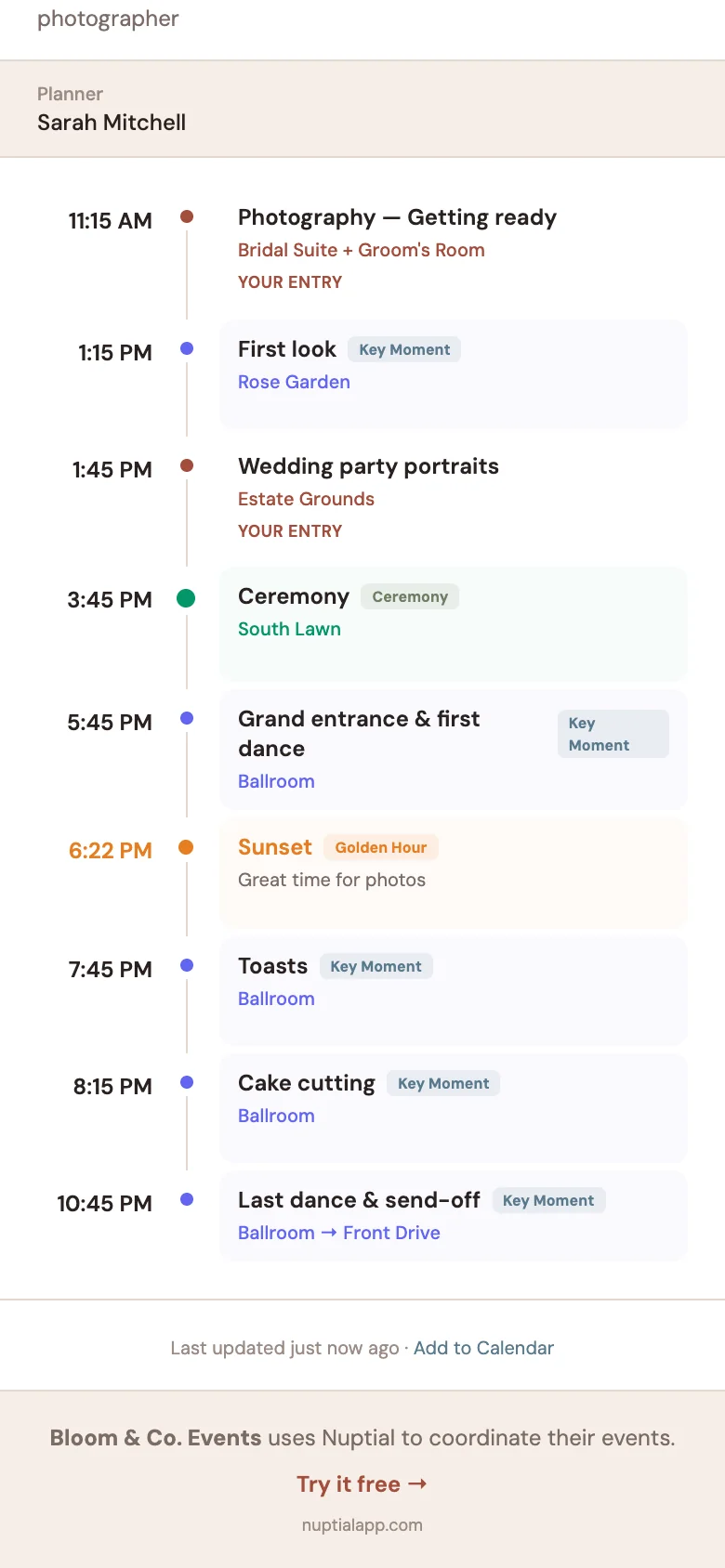
When we were designing the day-of coordination piece of Nuptial, we threw out the document model entirely. Instead of generating a PDF and emailing it, planners generate a link.
The link is a public URL — no login, no app to install, no account to create. The vendor opens it on their phone, sees a clean mobile-first view of the day, and bookmarks it. That's the entire vendor-facing experience. No "did you get my email" check-ins. No version numbers.
Three things make that simple link actually useful:
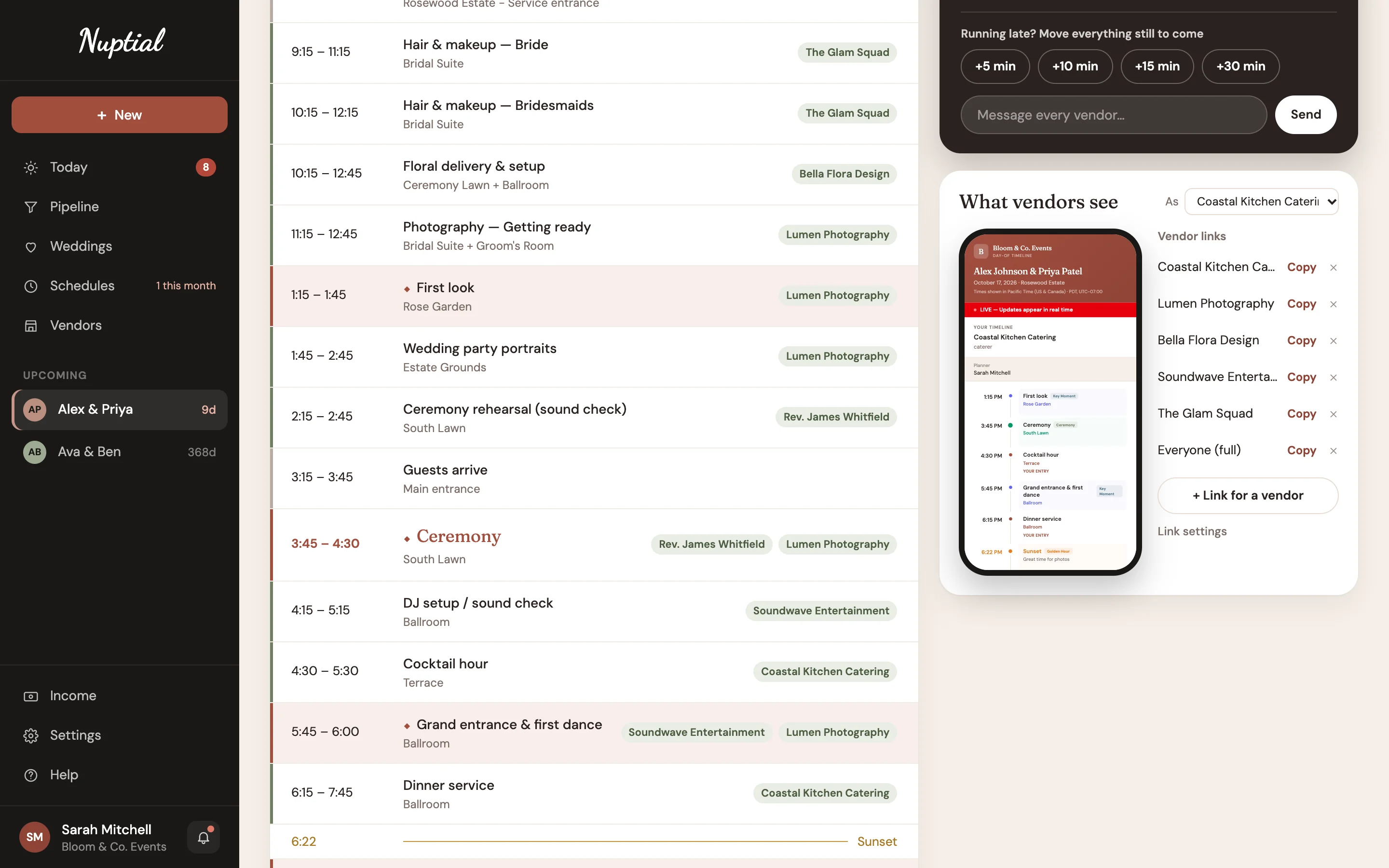
It's filtered. When you generate the link for a specific vendor, they see their own entries plus the day's key moments. The photographer sees getting-ready, first look, ceremony, family formals, reception entrance, first dance, cake, exit. The DJ sees load-in, sound check, ceremony cue, cocktail hour, grand entrance, dinner playlist, dance set. The florist sees venue access window, ceremony setup deadline, reception flip start, breakdown.
It's live. When you change the ceremony time at 4:00pm because the officiant just texted you, the photographer's bookmarked page reflects the new time the next time she opens it. No new email. No "v3" PDF. No "is this current?" text. With Day-Of Mode on, we use ActionCable to push updates in real-time, so if the vendor has the page open, they'll see the change without even refreshing.
It moves together. If the ceremony runs fifteen minutes late, push the rest of the day back in one step. Every later item moves with it: the photographer's family formals, the DJ's first-dance cue, the videographer's coverage window. You're not editing fifteen rows.
That's not a feature list. That's just what happens when you stop pretending a wedding day is a static document.
What this changes about your wedding day
The honest answer is: less than you think, and more than you think.
Less than you think, because most weddings still go fine without it. Planners have run thousands of beautiful weddings off PDF timelines. The system works, in the same way that paper wedding invitations work — a little wasteful, a little error-prone, but the show always goes on.
More than you think, because the place where it changes things isn't the wedding day itself. It's the week before the wedding day. The week of final calls and final adjustments and final emails and final printed timelines. That week is where most of the time goes, and most of the anxiety lives. Replacing "send a new PDF every time something changes" with "edit the timeline and walk away" is the kind of small change that adds up to an hour a wedding.
It also changes the wedding-day texts. Not all of them — vendors will still text you on the day, because that's the job. But the kind of texts you get changes. You stop getting "what time does ceremony start" and start getting "the cocktail napkins are missing, where do you want me to put the cake plates instead." Those second-kind texts are the ones you actually need to be answering. The first kind is a tool problem dressed up as a communication problem.
How to try it
If you're already using Nuptial, the day-of schedule is in each wedding's Schedule section: open Vendor links to make a link for each vendor, or one link for everyone.
If you're not, you can try it free. There's a 30-day trial that doesn't ask for a credit card, and if you join our newsletter we'll email you a code for three months free instead of one, to enter at checkout. The whole thing (CRM, planning, client portal, day-of coordination) costs less than two of the tools it replaces, and we built every piece of it after talking to planners about what they actually do all day.
If you've ever sent a "Timeline v3 (FINAL)" email, this one's for you.