Here's a question to ask yourself about a month before the wedding: if the ceremony starts twenty minutes late, who needs to know, and how will they find out?
At a wedding with a planner, the answer is the planner. At a wedding you're running yourselves, the answer tends to be "everyone texts us", at the exact moment you'd rather be doing anything else. And if the wedding has a welcome dinner and a mehendi as well as the ceremony, the question comes up three times, with different vendors each time.
The fix isn't a better group chat. It's a schedule for each event that every vendor can read for themselves.
One run of show per event
A run of show is the day in order: what happens, when, where, and who's involved. Hair and makeup at ten in the bridal suite. Ceremony at four on the lawn. Cocktail hour on the terrace. Reception in the pavilion. Send-off at ten.
If your wedding has more than one event, give each its own. The welcome dinner's run of show is short: guests arrive, dinner, the families' toasts. The mehendi's might be the artists setting up, the mehendi itself with music, dinner, then performances. They have different places, different vendors and often different people running them on the day. Folding them into one long document makes each one harder to read, and nobody working the mehendi needs to scroll past the wedding day to find their call time.
Write each one down with real times and real places. "Afternoon: photos" is a wish. "4:45 to 6:00, family photos on the terrace" is a plan.
It also helps to mark the sunset. If you want photos in the last good light, the sunset time tells your photographer when that is, and it changes with the date and the place.
Every vendor needs a different slice
Think about what each vendor actually needs from that schedule.
Your photographer needs when to arrive, where you'll be getting ready, when the ceremony starts, when family photos happen and when the light is best.
Your caterer needs access times, when guests arrive, when dinner is served and when the toasts happen, because nobody clears plates during a speech.
Your florist needs when they can get into the venue, when everything has to be ready, and when they can collect the rentals.
Your DJ or band needs load-in, sound check, the ceremony cue, the first dance and the last song.
Each of them also needs the day's key moments, so they know what everyone else is working towards: the ceremony, the first dance, the toasts. What they don't need is the other fifty lines.
So for each vendor, the useful version is: their own items, plus the key moments, for the events they're working. Nothing else.
Send a link, not a file
The traditional way is a PDF, emailed a few weeks out. It works the first time. It stops working the moment anything changes, because now there are two versions in everyone's inbox and nobody is sure which one is current.
A link that always shows the current schedule doesn't have that problem. The vendor opens it on their phone, bookmarks it, and whatever they see is the plan as it stands. No account to make, no app to install. When the caterer moves dinner by fifteen minutes, you change it once, and every vendor's link shows the new time.
A PDF still has its place: some venues want a printed copy for the coordinator's clipboard, and it's good to have one on paper for the person running the day. Print it the week of, from the same schedule, so it matches.
When the day runs late
It will. Hair and makeup runs over, the officiant is held up, a relative is missing for the family photo. On the day, the question isn't whether the schedule moves; it's how quickly everyone finds out.
Decide before the day who will make the change. Ideally it's someone who isn't one of the two of you: a parent, a friend from the wedding party, whoever is holding the schedule. If the ceremony starts fifteen minutes late, they push the rest of the day back by fifteen minutes in one step, and every later item moves with it. Every vendor sees the new times on their link. Nobody has to send a message, and nobody has to find the two of you to ask.
How we built it
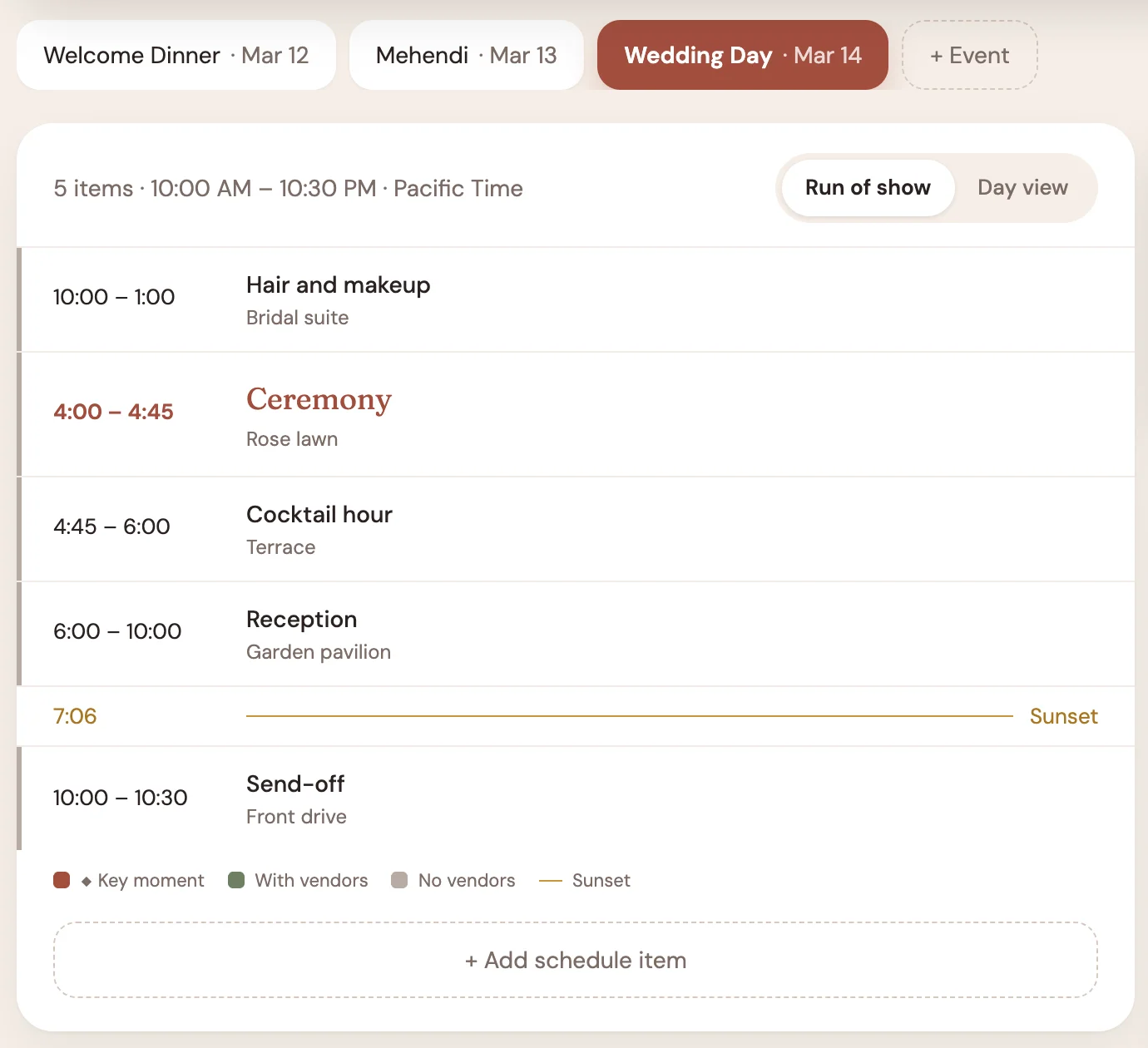
In Nuptial for Couples, every event of your wedding has its own schedule, with the sunset marked for a dated event at a venue with an address. You can mark the moments that matter as key moments and assign each item to the vendors working it. Then make a link for each vendor, for one event or for all of them: the vendor sees their own items and the day's key moments, with no app or sign-in. Turn on Day-Of Mode, or schedule it to come on by itself, and the changes you make reach every vendor's link live. Running late pushes the rest of the day back in one step. You can see which vendors have opened their link, and print the schedule as a PDF when the venue wants paper.
The checklist is free, with no card and no trial clock. Schedules and vendor links are part of the planning tools: here's what they add.
If you only do one thing from this post: decide now who holds the schedule on the day. Then make sure it isn't either of you.